
Introduction
In today’s digital world, having a website is no longer just an option for large companies. A website has become an important tool for businesses, freelancers, professionals, entrepreneurs, creators, students, and anyone who wants to establish a strong presence online.
Whether you want to build a website for your business, create a personal portfolio, start an online store, publish a blog, promote your services, or build your personal brand, understanding how to build your website can give you greater control over your online presence.
A website acts as your digital identity. It allows people to learn about you, understand what you offer, contact you, and take action whenever they need your products or services.
The good news is that building a website has become much easier than it was in the past. You do not necessarily need to be an expert programmer to create a professional-looking website. Website builders, content management systems, templates, hosting platforms, plugins, and other tools have made website development accessible to beginners.
However, creating a successful website is about more than simply selecting a template and publishing a few pages. A good website needs planning, a clear purpose, useful content, attractive design, good navigation, mobile responsiveness, security, speed, and search engine optimization.
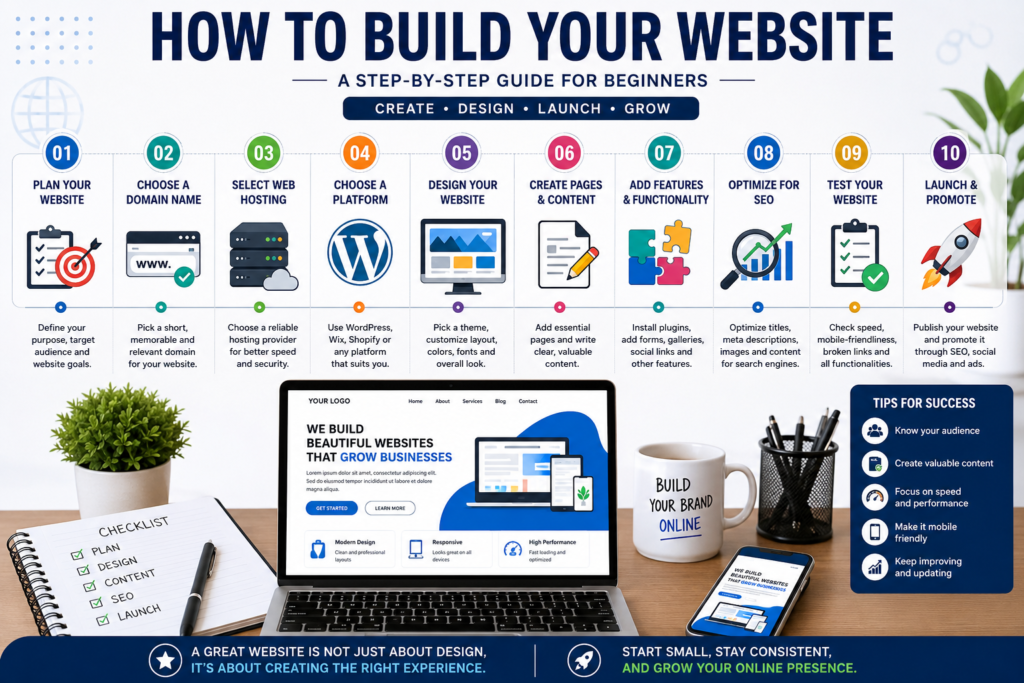
In this guide, we will explain how to build your website step by step, from choosing your website’s purpose and domain name to selecting hosting, planning pages, designing your website, creating content, and preparing it for launch.
What Is a Website?
A website is a collection of web pages and digital resources that are available online through a specific domain name.
For example, a business website may contain pages such as:
- Home
- About Us
- Services
- Products
- Blog
- Testimonials
- Contact
- Privacy Policy
Each page serves a specific purpose.
A website can be simple or complex depending on the goals of its owner.
A freelancer may need a simple portfolio website, while an e-commerce business may require hundreds or thousands of product pages, payment integration, customer accounts, and inventory management.
Before you start building a website, the most important thing is to understand what you want the website to achieve.
Why Do You Need a Website?
Before learning how to build your website, you should understand why you need one.
1. Build an Online Presence
A website helps establish your presence on the internet.
When people search for your name, company, product, or service, your website can provide them with accurate information.
2. Build Credibility
A professional website can help make a business appear more established and trustworthy.
Customers often research a company online before contacting or purchasing from it.
3. Generate Leads
A website can attract potential customers and encourage them to:
- Fill out a contact form
- Call your business
- Send an inquiry
- Book an appointment
- Request a quotation
- Subscribe to your newsletter
4. Sell Products or Services
An e-commerce website can allow customers to browse products and make purchases online.
Service businesses can also use websites to explain their services and generate inquiries.
5. Build a Personal Brand
Professionals can use websites to showcase:
- Skills
- Experience
- Portfolio
- Certifications
- Achievements
- Services
- Testimonials
A personal website can become the central hub of your professional identity.
6. Share Information
Blogs and content websites allow individuals and businesses to publish valuable information and attract audiences through search engines and social media.
Step 1: Define the Purpose of Your Website
The first step in building your website is defining its purpose.
Do not start with design.
Start with strategy.
Ask yourself:
What do I want visitors to do when they arrive on my website?
Your answer will determine the structure and functionality of the website.
For example:
Business Website
The goal may be to generate leads and inquiries.
Portfolio Website
The goal may be to demonstrate skills and previous work.
Blog
The goal may be to publish content and build an audience.
E-commerce Website
The goal is usually to sell products online.
Service Website
The goal may be to explain services and encourage visitors to contact you.
Personal Website
The goal may be to build a personal brand and showcase professional achievements.
Clearly defining your objective makes every later decision easier.
Step 2: Identify Your Target Audience
A website should not be designed for everyone.
You need to understand who your ideal visitors are.
Think about:
- Age
- Location
- Profession
- Interests
- Problems
- Needs
- Buying behavior
- Online habits
For example, a website targeting college students may use different language and design elements than a website targeting corporate decision-makers.
A local business may focus heavily on location-based information.
A luxury brand may focus more on visual presentation and brand storytelling.
Understanding your target audience helps you create a website that communicates effectively.
Step 3: Choose a Website Type
Once you understand your purpose and audience, decide what type of website you need.
Business Website
A business website provides information about a company and its offerings.
Typical pages include:
- Home
- About
- Services
- Testimonials
- Contact
- Blog
Portfolio Website
Portfolio websites are useful for:
- Designers
- Photographers
- Developers
- Writers
- Digital marketers
- Artists
- Freelancers
The website focuses heavily on previous work and achievements.
Blog Website
A blog allows you to regularly publish articles.
Blogs can be useful for education, personal branding, SEO, affiliate marketing, and audience building.
E-commerce Website
An e-commerce website allows users to browse products and purchase them online.
It may require:
- Product pages
- Shopping cart
- Checkout
- Payment gateway
- Order management
- Customer accounts
- Inventory management
Membership Website
A membership website provides restricted content or services to registered users.
It may include:
- User accounts
- Subscription plans
- Member-only content
- Payment systems
- Online courses
Step 4: Choose Your Domain Name
Your domain name is your website’s address on the internet.
For example:
yourbusiness.com
Choosing the right domain name is important because it becomes part of your brand identity.
A good domain name should ideally be:
- Easy to remember
- Easy to spell
- Short
- Relevant to your brand
- Easy to pronounce
- Professional
Avoid unnecessarily complicated names, excessive hyphens, or confusing spellings.
If possible, choose a domain that closely relates to your business or personal brand.
For example, if your company is called “ABC Digital Solutions,” a domain related to the brand may be easier for customers to remember.
Step 5: Select the Right Domain Extension
The domain extension is the ending of your domain name.
Common examples include:
- .com
- .in
- .org
- .net
- .co
For many businesses, .com is a popular choice.
For businesses primarily targeting India, a .in domain can also be relevant.
The best choice depends on your brand, audience, availability, and business strategy.
Most importantly, choose a domain that is professional and easy for your audience to remember.
Step 6: Purchase Web Hosting
A domain name is your website’s address.
Web hosting is where your website’s files are stored and delivered to visitors.
You can think of it this way:
Domain = Address
Hosting = Space where your website lives
When someone enters your domain into a browser, the hosting server delivers your website’s files to that visitor.
There are several types of hosting.
Shared Hosting
Multiple websites share server resources.
It is generally suitable for small websites and beginners.
VPS Hosting
A Virtual Private Server provides more dedicated resources and control.
It may be suitable for growing websites with higher requirements.
Cloud Hosting
Cloud hosting uses distributed infrastructure and can provide scalability.
Dedicated Hosting
A dedicated server provides an entire server environment for one customer.
It is generally used by websites with significant resource requirements.
Managed Hosting
Managed hosting providers may handle technical tasks such as server management, updates, security, and backups.
When choosing hosting, consider:
- Performance
- Reliability
- Storage
- Bandwidth
- Security
- Customer support
- Backup options
- Scalability
- Pricing
Do not choose hosting only because it is cheap.
Poor hosting can negatively affect website performance and user experience.
Step 7: Choose How You Will Build Your Website
There are several ways to build a website.
The best method depends on your technical knowledge, budget, goals, and website requirements.
Option 1: Website Builder
Website builders allow users to create websites using visual interfaces.
They are often suitable for beginners who want to build a website without writing much code.
Option 2: Content Management System
A Content Management System, or CMS, allows users to create and manage website content.
WordPress is one of the most widely used CMS platforms.
A CMS can provide:
- Themes
- Plugins
- Page builders
- Content management
- Media management
- SEO tools
- E-commerce capabilities
Option 3: Custom Development
Businesses with specific technical requirements may choose custom website development.
Custom websites can provide greater control over functionality and design, but they generally require more technical expertise and development resources.
For beginners and many small businesses, a CMS can be a practical starting point.
Step 8: Plan Your Website Structure
Before designing individual pages, create a website structure.
This is sometimes called a sitemap or website architecture.
For example:
Home
→ About
→ Services
→ Service 1
→ Service 2
→ Service 3
→ Portfolio
→ Blog
→ Contact
This structure helps visitors navigate the website.
It also helps search engines understand the relationship between pages.
A well-organized website should make it easy for visitors to find what they need.
Step 9: Create the Essential Pages
Most professional websites need several basic pages.
Home Page
The home page is usually the first major page visitors see.
It should quickly communicate:
- Who you are
- What you offer
- Who you help
- Why visitors should choose you
- What action they should take
A strong homepage can include:
- Headline
- Supporting message
- Call-to-action
- Services
- Benefits
- Testimonials
- Portfolio
- About section
- Contact information
About Page
The About page explains who you are and why your business exists.
It can include:
- Company story
- Mission
- Values
- Experience
- Team
- Achievements
Avoid making the page only about yourself.
Explain how your experience benefits your customers.
Services Page
Clearly explain your services.
For every service, describe:
- What it is
- Who it is for
- Benefits
- Process
- Expected outcomes
- How to get started
Contact Page
Make it easy for visitors to contact you.
You can include:
- Contact form
- Phone
- Business address
- Social media profiles
- Business hours
Blog Page
A blog can help you publish useful content and potentially attract organic search traffic.
Step 10: Plan Your Website Content
Content is one of the most important elements of a website.
A beautiful website with weak content may not produce good results.
Your content should answer visitor questions clearly.
Before writing content, identify:
- Main services
- Customer problems
- Benefits
- Frequently asked questions
- Important keywords
- Competitive advantages
- Calls to action
Write for humans first.
Avoid filling pages with unnecessary keywords or complicated language.
Your goal should be to make the visitor understand your business quickly.
Step 11: Design Your Website
Once the structure and content plan are ready, you can begin designing the website.
Good website design should be attractive but also functional.
Important design elements include:
- Typography
- Colors
- Images
- White space
- Buttons
- Navigation
- Layout
- Visual hierarchy
A professional website should have consistency across its pages.
Use a limited color palette.
Choose readable fonts.
Avoid filling every section with unnecessary design elements.
The design should support the content rather than distract from it.
Step 12: Create a Clear Navigation Menu
Website navigation helps visitors move from one page to another.
A simple navigation menu might contain:
Home | About | Services | Blog | Contact
For larger websites, dropdown menus or categorized navigation may be necessary.
Keep navigation simple.
Visitors should not have to search extensively to find important information.
A good rule is to make important pages accessible within a few clicks.
Step 13: Add Strong Calls to Action
A Call to Action, or CTA, tells visitors what to do next.
Examples include:
- Get Started
- Contact Us
- Book a Consultation
- Request a Quote
- Shop Now
- Learn More
- Download Guide
- Schedule a Call
Without clear CTAs, visitors may not know what action to take.
Place CTAs naturally throughout the website.
For example, a service page might end with:
“Ready to grow your business online? Contact us today.”
The CTA should match the purpose of the page.
Step 14: Use High-Quality Images
Images can make a website more attractive and engaging.
Use images that are:
- Relevant
- High quality
- Properly sized
- Professionally presented
- Optimized for web performance
Avoid using random stock images that have no connection with your brand.
For a professional business, original photographs, product images, team photos, project screenshots, and custom graphics can create a stronger impression.
Step 15: Make Your Website Mobile-Friendly
Mobile responsiveness is essential.
A website should work properly on:
- Smartphones
- Tablets
- Laptops
- Desktop computers
Mobile visitors should be able to read text, click buttons, navigate menus, and complete forms without difficulty.
Common mobile problems include:
- Tiny text
- Buttons that are difficult to click
- Horizontal scrolling
- Slow loading
- Broken layouts
- Oversized images
Always test your website on different screen sizes before launch.
Step 16: Focus on Website Speed
Website speed affects user experience.
If a page takes too long to load, visitors may leave before seeing your content.
Common reasons for slow websites include:
- Large images
- Too many plugins
- Poor hosting
- Excessive scripts
- Unoptimized code
- Heavy themes
- Unnecessary animations
You can improve performance by:
- Compressing images
- Using modern image formats
- Removing unnecessary plugins
- Using caching
- Choosing reliable hosting
- Optimizing website code
- Reducing unnecessary scripts
A fast website provides a better experience and supports overall website quality.
Step 17: Set Up Basic Website Security
Security should be considered from the beginning.
Basic security measures can include:
- HTTPS
- Strong passwords
- Regular backups
- Software updates
- Security plugins where appropriate
- Limited administrator access
- Reliable hosting
HTTPS is particularly important because it helps protect data transferred between visitors and the website.
If your website collects personal information, security becomes even more important.
Step 18: Install Analytics and Tracking
You should understand how visitors interact with your website after launch.
Analytics tools can help you understand:
- Number of visitors
- Traffic sources
- Popular pages
- User behavior
- Conversions
- Device usage
- Geographic information
This information can help you improve your website.
For example, if a page receives substantial traffic but generates few inquiries, you can investigate the page and improve its content or CTA.
Step 19: Prepare Your Website for SEO
Search Engine Optimization should be considered during website development, not added as an afterthought.
Basic SEO preparation includes:
- Clear page titles
- Useful headings
- Relevant keywords
- Descriptive URLs
- Internal links
- Optimized images
- Helpful content
- Mobile-friendly design
- Fast loading
- Proper indexing
- Logical site structure
SEO is a long-term process.
A website should continuously publish useful content and improve its technical and content quality.
Step 20: Test Everything Before Launch
Before publishing your website, test every important element.
Check:
- Navigation
- Buttons
- Contact forms
- Links
- Images
- Mobile layout
- Desktop layout
- Page speed
- Spelling
- Grammar
- SEO elements
- Security
- Checkout functionality, if applicable
Ask someone unfamiliar with the website to test it.
A fresh user may notice problems that you have overlooked.
Conclusion
Building a website is a process that starts long before you press the publish button.
You need to define the purpose of your website, understand your audience, choose a domain, select hosting, choose the right development platform, plan your structure, create valuable content, design the pages, optimize performance, and prepare the website for search engines.
A successful website is not simply a collection of attractive pages.
It is a digital platform designed to help users find information, solve problems, take action, and interact with a business or individual.
How to Build Your Website: A Complete Step-by-Step Guide for Beginners — Part 2
Introduction
Building a website does not end when the pages are designed and published. A successful website needs continuous improvement, search engine optimization, security, content updates, performance monitoring, and promotion.
In Part 1, we covered the foundations of website development, including choosing a website purpose, identifying your target audience, selecting a domain and hosting, planning your website structure, creating important pages, designing the website, improving speed, and preparing it for SEO.
In Part 2, we will focus on what happens after the basic website has been created. We will discuss how to launch your website properly, improve its visibility, generate traffic, convert visitors into customers, maintain security, create content, measure performance, avoid common mistakes, and develop your website over the long term.
A website should be treated as an ongoing digital asset rather than a one-time project.
Step 21: Connect Your Domain to Your Website
Once your website is ready, your domain needs to be connected to your hosting or website platform.
This usually involves changing DNS settings.
DNS helps direct visitors who enter your domain name to the correct server.
The exact process depends on your domain registrar and hosting provider.
After making the changes, it may take some time for the settings to update across the internet.
Once the connection is complete, test your domain from different devices and browsers.
Make sure both the main version of your website and the preferred HTTPS version work correctly.
Step 22: Install an SSL Certificate
An SSL certificate enables HTTPS for your website.
You will notice HTTPS at the beginning of a secure website address.
For example:
HTTPS helps encrypt information exchanged between the visitor and the website.
This is especially important for websites that collect:
- Contact information
- Login details
- Payment information
- Personal information
A professional website should use HTTPS.
After activating SSL, check that all website pages load correctly through the secure version.
Step 23: Create a Professional Homepage
Your homepage is one of the most important parts of your website.
Visitors should understand what your website is about within a few seconds.
A strong homepage can follow a structure such as:
Hero Section
Clearly communicate what you offer.
For example:
“Digital Marketing Services That Help Local Businesses Grow Online.”
Add a short supporting sentence and a clear CTA.
Services Section
Show your main services.
Benefits Section
Explain why customers should choose you.
About Section
Introduce your business or personal brand.
Testimonials
Display genuine customer feedback.
Portfolio or Case Studies
Show evidence of your work.
Final CTA
Give visitors a clear next step.
The homepage should not try to explain everything.
Its job is to guide visitors toward the information or action they need.
Step 24: Create Dedicated Service Pages
If you provide multiple services, do not place everything on one page.
Create individual pages for important services.
For example, a digital marketing website could have:
- SEO Services
- Google Ads Services
- Social Media Marketing
- Website Development
- Content Marketing
- Local SEO
Dedicated pages provide more space to explain each service.
They can also target specific search queries.
A strong service page can include:
- Service introduction
- Customer problem
- Your solution
- Benefits
- Process
- Features
- Portfolio
- Testimonials
- FAQs
- Call to action
This structure can help both users and search engines understand the purpose of the page.
Step 25: Develop a Blog Strategy
A blog can be one of the most valuable sections of a website.
Publishing useful articles can help attract people searching for information related to your products or services.
For example, a web development company could write articles about:
- How to create a website
- Website design trends
- How much a website costs
- WordPress website development
- Website speed optimization
- Common website mistakes
- SEO for beginners
These articles can attract users at different stages of the buying journey.
Some visitors may simply be researching.
Others may be comparing solutions.
Some may already be ready to purchase.
A good blog strategy can address all these stages.
Step 26: Perform Keyword Research
Keyword research helps you understand what people search for online.
Before creating important pages or blog posts, identify relevant search terms.
For example, a website development business might research keywords such as:
- Website development company
- How to build a website
- Website design services
- WordPress website development
- Website development cost
- Best website developer
- Business website development
Do not select keywords based only on search volume.
Consider:
- Search intent
- Relevance
- Competition
- Business value
- Location
- Customer needs
The best keyword is not necessarily the keyword with the highest search volume.
It is the keyword that attracts the right audience.
Step 27: Understand Search Intent
Search intent means understanding what a person actually wants when they search for something.
For example:
“What is website development?”
This is mainly an informational search.
“Best website development company in Mumbai”
This may indicate commercial research.
“Hire website developer”
This can indicate stronger purchasing intent.
Your content should match the user’s intent.
If someone is looking for information, provide a useful explanation.
If someone is looking for a service, provide clear information about your offering and make it easy to contact you.
Step 28: Optimize Page Titles and Meta Descriptions
Every important page should have a clear title.
The title helps search engines and users understand the page.
For example:
How to Build a Website: Complete Beginner’s Guide
A meta description provides additional information about the page.
A good meta description can summarize the content and encourage users to click.
Avoid stuffing keywords into titles or descriptions.
Make them natural and useful.
Step 29: Use Proper Headings
Headings organize your content.
A typical page can use:
- H1 for the main title
- H2 for major sections
- H3 for subsections
For example:
H1: How to Build a Website
H2: Choose Your Domain
H2: Select Web Hosting
H2: Design Your Website
H3: Create a Mobile-Friendly Layout
Proper headings make long content easier to read.
They also help search engines understand the structure of your page.
Step 30: Build Internal Links
Internal links connect one page of your website to another page on the same website.
For example, a blog about SEO could link to your SEO service page.
A blog about website design could link to your website development service.
Internal linking can help:
- Users discover related content
- Search engines discover pages
- Distribute website authority
- Improve navigation
- Create logical topic relationships
Use descriptive anchor text rather than vague phrases such as “click here.”
Step 31: Create High-Quality Content
Your website content should provide real value.
Avoid writing content only to increase word count.
Good content should:
- Answer questions
- Solve problems
- Provide useful information
- Demonstrate expertise
- Be easy to understand
- Be accurate
- Be updated when necessary
For business websites, content should also communicate the company’s value proposition.
Tell visitors what makes your business different.
Step 32: Add Testimonials and Reviews
Social proof can influence purchasing decisions.
Testimonials can show potential customers that other people have had positive experiences with your business.
A testimonial section can include:
- Customer name
- Business name
- Short review
- Project details
- Photo, where appropriate
Never create fake testimonials.
Use genuine feedback.
You can also link or reference legitimate third-party review profiles where appropriate.
Step 33: Add Case Studies
Case studies provide stronger evidence than general claims.
Instead of saying:
“We help businesses increase online visibility.”
A case study can explain:
- The client’s problem
- The strategy used
- Work completed
- Challenges
- Results
- Lessons learned
Case studies are particularly useful for agencies, consultants, freelancers, and service businesses.
They demonstrate how your expertise works in real situations.
Step 34: Optimize Images
Images can improve website design, but poorly optimized images can slow down your website.
Before uploading an image:
- Resize it appropriately
- Compress it
- Use a suitable format
- Give it a descriptive filename
- Add appropriate alternative text
For example, instead of:
IMG12345.jpg
use a descriptive filename related to the image.
Alternative text can help explain images to users who cannot see them and can also support accessibility.
Step 35: Make Your Website Accessible
Accessibility means making your website usable by as many people as possible, including people with disabilities.
Basic practices include:
- Readable font sizes
- Sufficient contrast
- Descriptive link text
- Alternative text for meaningful images
- Keyboard-friendly navigation
- Clear forms
- Logical page structure
Accessibility should be considered during website design rather than added at the very end.
Step 36: Improve Conversion Rate
Getting visitors is only one part of website success.
You also need to encourage visitors to take meaningful actions.
These actions could include:
- Buying a product
- Calling your business
- Sending an inquiry
- Booking a meeting
- Filling out a form
- Signing up for an email list
To improve conversions, make your value proposition clear.
Answer the visitor’s most important questions:
What do you offer?
Who is it for?
Why should I choose you?
What should I do next?
A clear website reduces uncertainty.
Step 37: Use Strong Calls to Action
Your CTA should tell visitors exactly what to do.
Examples include:
- Get a Free Consultation
- Contact Our Team
- Request a Quote
- Start Your Project
- Book an Appointment
- Shop Now
- Download the Guide
Avoid using too many competing CTAs.
A page should generally have a primary action.
Step 38: Create a Contact Form
A contact form provides a convenient way for visitors to reach your business.
Depending on your needs, you can ask for:
- Name
- Phone number
- Company
- Service required
- Project details
Do not ask for unnecessary information.
Long forms can discourage visitors from submitting inquiries.
For high-value services, however, additional questions may help qualify leads.
Step 39: Set Up Email Notifications
Whenever someone submits a contact form, you should receive a notification.
Test this process before launching your website.
Make sure:
- The form works.
- The visitor receives confirmation if appropriate.
- Your team receives the inquiry.
- Messages do not disappear into spam folders.
A broken contact form can result in lost business.
Step 40: Connect Your Website With Social Media
Social media can help drive traffic to your website.
Add relevant social media links where appropriate.
You can also promote your website content through:
- YouTube
- Other relevant platforms
Do not create social profiles simply because they exist.
Focus on platforms where your target audience is active.
Step 41: Promote Your Website
Publishing your website does not automatically guarantee visitors.
You need a promotion strategy.
Possible methods include:
SEO
Create optimized content and improve organic visibility.
Social Media
Share useful content and website pages.
Email Marketing
Send new articles, offers, and updates to subscribers.
Paid Advertising
Use targeted advertising to generate traffic.
Networking
Share your website through professional relationships and communities.
Content Marketing
Publish useful information that attracts your target audience.
A combination of methods is often more effective than relying on one channel.
Step 42: Use Local SEO for Local Businesses
If your business serves a particular location, local SEO can be extremely valuable.
Make sure your website clearly communicates:
- Business name
- Service area
- Address, when appropriate
- Phone number
- Business hours
- Services
- Location-specific information
Create useful local content rather than simply repeating city names.
For example, a web development professional targeting Mumbai could create useful content about website development for Mumbai businesses rather than simply inserting the word “Mumbai” repeatedly.
Step 43: Monitor Website Analytics
After launch, monitor website performance regularly.
Important metrics can include:
- Users
- Sessions
- Traffic sources
- Top pages
- Engagement
- Conversions
- Leads
- Sales
Analytics should not be used simply to collect numbers.
Use the information to make decisions.
For example:
If organic traffic is increasing but conversions are low, improve your landing pages.
If one blog attracts significant traffic, create related content.
If visitors leave quickly from a specific page, investigate its content and user experience.
Step 44: Monitor Search Performance
SEO tools can help you understand how your website appears in search results.
Track:
- Search queries
- Impressions
- Clicks
- Click-through rates
- Ranking trends
- Indexed pages
- Technical issues
SEO results often take time.
Do not expect every new page to rank immediately.
Focus on long-term improvements.
Step 45: Keep Your Website Updated
A website should not remain unchanged for years.
Update:
- Services
- Prices
- Contact information
- Team information
- Portfolio
- Testimonials
- Blog content
- Images
- Business information
Outdated information can reduce trust.
For example, if a website advertises a service that is no longer available, customers may become confused.
Step 46: Maintain Website Security
Security maintenance should be ongoing.
Regularly:
- Update your CMS
- Update plugins
- Update themes
- Review user accounts
- Check backups
- Monitor suspicious activity
- Use strong passwords
Avoid installing unnecessary plugins or themes from unreliable sources.
A secure website protects both the business and its visitors.
Step 47: Back Up Your Website
Backups are extremely important.
If your website is hacked, damaged, or accidentally modified, a recent backup can help restore it.
A good backup strategy should consider:
- Website files
- Database
- Media
- Important configuration
Do not assume that your hosting provider’s backup system is your only backup.
For important websites, maintain an appropriate independent backup strategy.
Step 48: Avoid Common Website Mistakes
Many websites fail because of basic problems.
Mistake 1: Complicated Navigation
Visitors cannot find important information.
Mistake 2: Too Much Text
Large blocks of text can be difficult to read.
Use headings, short paragraphs, lists, and visual elements.
Mistake 3: Poor Mobile Design
A website that works only on desktop devices can lose mobile visitors.
Mistake 4: Slow Loading
Large files and unnecessary scripts can reduce performance.
Mistake 5: No Clear CTA
Visitors do not know what to do next.
Mistake 6: Weak Content
Generic content does not communicate value.
Mistake 7: Ignoring SEO
A website may look attractive but receive little organic traffic.
Mistake 8: No Security Updates
Outdated software can create security risks.
Mistake 9: No Analytics
Without data, it is difficult to understand performance.
Mistake 10: Building and Forgetting
A website needs continuous maintenance and improvement.
Step 49: Understand the Cost of Building a Website
The cost of building a website can vary significantly.
Several factors affect the total cost:
- Domain
- Hosting
- Design
- Development
- Themes
- Plugins
- Content
- Photography
- SEO
- Maintenance
- E-commerce functionality
- Custom integrations
A basic website can be relatively affordable, while a complex custom website can require a much larger investment.
Instead of choosing a website based only on price, consider the value it can generate.
A website that helps generate customers can become an important business asset.
Step 50: Decide Whether to Build It Yourself or Hire a Professional
One of the most important decisions is whether you should build your website yourself or hire someone.
Build It Yourself
DIY website development may be suitable if:
- You have a small budget
- Your website is simple
- You have time to learn
- You enjoy working with technology
The advantage is greater control and potentially lower initial cost.
The disadvantage is that you may spend significant time learning design, development, SEO, security, and maintenance.
Hire a Professional
Professional development may be more appropriate if:
- Your website is important to your business
- You need custom functionality
- You have limited technical knowledge
- You need a professional design
- You want to save time
- You need ongoing support
A professional can help with planning, development, SEO, performance, security, and maintenance.
Step 51: Create a Website Content Calendar
If your website includes a blog, create a content calendar.
For example, you could publish:
Week 1: Beginner’s guide
Week 2: Common mistakes
Week 3: Industry trends
Week 4: Case study
Over time, consistent publishing can create a larger library of useful content.
Quality should remain more important than publishing frequency.
Step 52: Build Topic Authority
Instead of publishing random articles, organize content around related topics.
For example, if your website focuses on website development, you could create content about:
- Website design
- WordPress
- Hosting
- Domains
- SEO
- Website security
- Website speed
- Mobile optimization
- Conversion optimization
Then connect these articles through internal links.
This creates a strong topic structure.
Step 53: Improve Your Website Based on User Feedback
Your visitors can provide valuable information.
Ask customers:
- Was it easy to find information?
- Was the website easy to use?
- Was anything confusing?
- What information was missing?
- What made you contact us?
- What almost stopped you from contacting us?
Use feedback to improve the website.
The best website is not necessarily the one the owner likes most.
It is the one that works well for its target audience.
Step 54: Build Trust With Your Website
Trust is essential for online businesses.
You can build trust through:
- Clear contact information
- Professional design
- Real testimonials
- Case studies
- Transparent pricing where appropriate
- Secure payment systems
- Privacy information
- Clear policies
- Professional content
- Consistent branding
Avoid exaggerated claims.
Be honest about what you can deliver.
Step 55: Make Your Website Scalable
Your website should be able to grow with your business.
Think about future requirements.
You may eventually want:
- More services
- More products
- More blog posts
- More team members
- E-commerce
- Booking systems
- Memberships
- Customer accounts
- Integrations
Choosing a flexible platform and organizing your website properly can make future expansion easier.
Complete Website Launch Checklist
Before launching your website, use this checklist.
Planning
- Website purpose is clearly defined
- Target audience is identified
- Website type is selected
- Competitors have been researched
- Website structure is planned
Domain and Hosting
- Domain name is registered
- Hosting is configured
- DNS is connected
- SSL certificate is active
Design
- Website is visually consistent
- Navigation is simple
- Fonts are readable
- Images are high quality
- Buttons are easy to identify
- Mobile layout works correctly
Content
- Homepage is complete
- About page is complete
- Service pages are complete
- Contact page is complete
- Blog is ready if required
- Calls to action are clear
- Content has been proofread
SEO
- Page titles are optimized
- Meta descriptions are written
- Headings are structured
- URLs are clear
- Images have appropriate alt text
- Internal links are added
- Sitemap is configured
- Important pages can be indexed
Performance
- Images are compressed
- Website loads quickly
- Unnecessary plugins are removed
- Mobile performance is checked
- Broken links are fixed
Security
- HTTPS is active
- Strong passwords are used
- Software is updated
- Backups are configured
- Administrator access is controlled
Tracking
- Analytics is configured
- Search performance monitoring is configured
- Contact form tracking is tested
- Conversion goals are considered
What Makes a Website Successful?
A successful website is not simply one that looks attractive.
It should accomplish specific business or communication objectives.
A successful website should be:
Useful
It provides information that visitors actually need.
Easy to Use
Visitors can navigate without confusion.
Fast
Pages load efficiently.
Mobile-Friendly
The experience works across different devices.
Secure
Visitor and business information is protected appropriately.
Search-Friendly
Search engines can understand and discover important content.
Persuasive
The website communicates value clearly.
Conversion-Focused
Visitors have clear next steps.
Trustworthy
The website provides accurate information and evidence of credibility.
Scalable
The website can grow as requirements change.
The Website Development Process in Simple Terms
The entire process can be summarized as:
1. Define the Goal
Understand why you need the website.
2. Research the Audience
Understand who you want to reach.
3. Choose a Domain
Select a memorable website address.
4. Purchase Hosting
Choose where your website will operate.
5. Select a Platform
Choose a CMS, website builder, or custom development approach.
6. Plan the Structure
Create the pages and navigation.
7. Design the Website
Create the visual layout.
8. Write the Content
Develop useful and persuasive website copy.
9. Add Functionality
Install forms, e-commerce features, booking systems, or other necessary tools.
10. Optimize for SEO
Make your website easier to understand and discover.
11. Test Everything
Check functionality, design, performance, and mobile usability.
12. Launch
Make the website publicly available.
13. Promote
Use SEO, social media, email, advertising, and other channels.
14. Measure
Track traffic, engagement, leads, and sales.
15. Improve
Continue optimizing based on data and feedback.
Final Conclusion
Learning how to build your website is an important skill in today’s digital environment.
Whether you are an entrepreneur, freelancer, student, professional, blogger, creator, or business owner, a website can become the foundation of your online presence.
The process begins with a clear goal.
You need to understand your audience, choose an appropriate domain and hosting solution, select the right development platform, plan your website structure, create useful content, design a user-friendly interface, and make the website fast, secure, mobile-friendly, and search-engine friendly.
But launching the website is only the beginning.
A successful website requires ongoing work.
You need to publish and update content, monitor analytics, improve SEO, maintain security, test conversions, collect customer feedback, and adapt to changing technology.
One of the biggest mistakes businesses make is treating a website as a one-time expense.
A website should instead be viewed as a long-term digital asset.
As your business grows, your website can grow with it.
You can add new services, publish more content, improve your SEO, introduce e-commerce, add booking functionality, create landing pages, build email lists, and develop new ways to communicate with customers.
The most important principle is to build your website for people first.
Technology is important, but your website ultimately exists to serve visitors.
Give them clear information.
Make navigation easy.
Answer their questions.
Demonstrate your value.
Build trust.
Make it easy for them to take action.
When these elements work together, your website can become much more than an online brochure.
It can become a powerful platform for branding, marketing, lead generation, sales, customer relationships, and long-term business growth.
Final Takeaway
If you are wondering how to build your website, remember this simple formula:
Plan → Build → Optimize → Launch → Promote → Measure → Improve
Do not aim for perfection on day one.
Build a strong foundation, launch a useful website, learn from your visitors, and continue improving it.
The internet is constantly changing, and successful websites change with it.
A well-planned and properly maintained website can help you establish credibility, reach new audiences, generate leads, sell products and services, and build a strong digital presence for years to come.